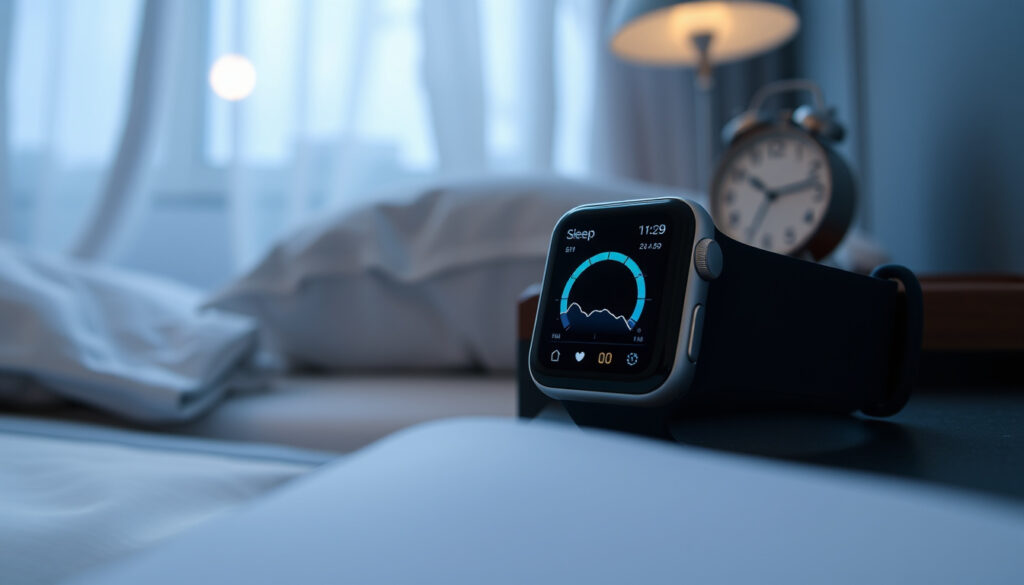
How to Track Sleep on Apple Watch: Setup & Troubleshooting
Few things feel as frustrating as waking up after what felt like a full night’s sleep only to find your Apple Watch recorded nothing. Sleep tracking on the watch isn’t automatic out of the box — it requires a deliberate setup that many users miss. This guide walks through exactly how to enable it, what the data actually means, and why your watch sometimes draws a blank.
Apple Watch models with sleep tracking: Series 3 and later (excluding SE 1st gen) ·
Sleep stages detected: 4: REM, Core, Deep, Awake ·
Minimum sleep tracking duration for data: 4 hours per night ·
Data retention period in Health app: 14 days on Watch, indefinitely on iPhone
Quick snapshot
- Apple Watch Series 3 or later (SE 1st gen works but no stages) (Apple Support)
- iPhone 6s or later with iOS 14+ (Apple Support)
- WatchOS 7+ for basics, watchOS 9+ for stages (Apple Support)
- Open Watch app > My Watch tab > Sleep
- Tap “Track Sleep with Apple Watch”
- Set Sleep Schedule (optional but recommended)
- Time in bed
- Sleep duration
- Sleep stages (if supported model)
- Sleep score (watchOS 10+)
- Exact ML model version for stage classification is not public (Sleep Review Magazine)
- Accuracy in people with sleep disorders not independently verified (Sleep Review Magazine)
- Overestimation of light sleep by ~45 min and deep sleep by ~43 min reported in one study (Sleep Review Magazine)
The table below captures the essential facts about Apple Watch sleep tracking at a glance.
| Fact | Value |
|---|---|
| First supported watchOS | watchOS 7 (2020) |
| Models with stage detection | Series 6, 7, 8, 9, Ultra, SE 2nd gen |
| Automatic start condition | Sleep Schedule with Sleep Focus active |
| Data synced to | iPhone Health app via iCloud |
How do I get my Apple Watch to track my sleep?
Set up Sleep Focus in the Watch app on iPhone
- Open the Watch app on your iPhone and tap the My Watch tab, then tap Sleep. (Apple Support – official setup guide)
- Tap “Get Started” under Set Up Sleep and follow the prompts to configure your Sleep Schedule.
- Enable charging reminders so your watch reminds you to charge before Wind Down time. (Apple Support)
Enable Track Sleep with Apple Watch
- In the Watch app, make sure “Track Sleep with Apple Watch” is toggled on. (Apple Support Communities)
- Without this toggle, the watch will not log sleep data even if you wear it to bed.
Wear your Apple Watch to bed with sufficient battery
- Apple recommends at least 30% battery before bedtime. (Apple Support)
- If the battery dies during the night, no sleep data is recorded. (Apple Support)
- Wear the watch snugly — a loose fit can cause the accelerometer to misinterpret normal movements as extra motion. (Apple Support)
Users who skip the Sleep Schedule setup often see no data. The watch is designed around a planned bedtime, not casual wear. Schedule your Wind Down and Bedtime, or manually enable Sleep Focus before closing your eyes.
Does my Apple Watch track sleep automatically?
When sleep tracking activates automatically
- If you have a Sleep Schedule with Sleep Focus set, the watch will start recording when the schedule begins (Wind Down or Bedtime). (Apple Support)
- If you fall asleep outside the schedule, the watch may still log sleep if you manually turn on Sleep Focus and have sufficient battery.
When you must manually enable it
- Without a schedule, sleep tracking does not start on its own. You must turn on Sleep Focus from Control Center. (Apple Support Communities)
Automatic detection vs manual schedule
- The Watch uses accelerometer and heart rate sensor data to detect sleep vs wake, but it only begins logging when Sleep Focus is active. (Apple Support)
- There is no fully automatic “detect and start” mode — the focus must be on.
The trade-off: Apple prioritises privacy and user control over passive always-on logging. If you want automatic tracking, you need to commit to a schedule.
How does sleep tracking work on the Apple Watch?
Sensors used: accelerometer and heart rate monitor
- The accelerometer detects micro-movements to distinguish sleep stages. (PMC (peer-reviewed study) – sensor methodology)
- Heart rate variability data helps refine stage classification. (PMC – sleep stage accuracy study)
Sleep stages definition: REM, Core, Deep, Awake
- Apple Watch divides sleep into these four categories. (Empirical Health (analysis platform) – definition)
- Stage data is available from watchOS 9 on supported models (Series 6+).
Data integration with iPhone Health app
- Sleep data syncs automatically via iCloud to the Health app on iPhone. (Apple Support)
- You can view time in bed, sleep duration, and stage breakdowns in Health > Browse > Sleep.
The accelerometer measures movement, not brainwaves. Stage classification is a statistical inference — useful for trends, not a clinical diagnosis. The PMC study showed deep sleep sensitivity of only 50.5% compared to polysomnography. (PMC)
Can Apple Watch detect REM and deep sleep?
Which Apple Watch models support sleep stage detection
- Stage detection is limited to Series 6, 7, 8, 9, Ultra, and SE 2nd gen. (Apple Support)
- Earlier models (Series 3–5, SE 1st gen) only record time in bed and estimated sleep duration.
Accuracy compared to medical devices
- A 2023 PMC study found Apple Watch 8 had Cohen’s kappa of 0.53 for four-stage classification, the highest among tested wearables. (PMC – sleep-latency study)
- Stage precision: 72.7% for light sleep, 87.8% for deep sleep, 77.7% for REM. (PMC – precision values)
- Another study reported overestimation of deep sleep by 43 minutes on average. (Sleep Review Magazine – comparison study)
What the data represents in Health app
- The Health app shows each sleep stage as a colored bar on the timeline. Tap any bar for exact duration.
- Wake time includes periods when you were still but not sleeping — the watch cannot distinguish lying awake from light sleep in all cases.
Why is sleep not tracking on my Apple Watch?
Battery too low at bedtime
- If your watch drops below 30% during the night, tracking stops. (Apple Support)
- Charge to at least 40% before bed.
Sleep Focus not enabled
- Without Sleep Focus active (either via schedule or manual), no sleep data is logged. (Apple Support Communities)
- Check in Control Center that the crescent moon icon is on.
Software or sensor issues
- Outdated watchOS versions can cause tracking failures. Keep watchOS updated to the latest. (Apple Support Communities)
- If the watch is too loose, it may overcount movement and fail to register sleep correctly. (Apple Support)
- Sleep results may take several minutes to appear after Sleep Focus is turned off. (Apple Support Communities)
If you’ve done all the steps and still see no data, check that your iPhone’s Health app has data sharing enabled for Sleep. A soft reset of both devices often resolves glitches.
Is 40 minutes of deep sleep a night enough?
Recommended deep sleep percentage by age
- Adults typically need 13–23% of total sleep time in deep sleep. For a 7-hour night, that’s 54–97 minutes. (Empirical Health – clinical context)
- 40 minutes may be low if total sleep is 7+ hours, but can be normal if total sleep is 5–6 hours.
What Apple Watch reports as deep sleep
- Deep sleep on Apple Watch corresponds roughly to N3 stage in clinical sleep. But the watch tends to overestimate deep sleep duration in some studies. (Sleep Review Magazine)
- If your watch shows 40 minutes, actual deep sleep could be closer to 20–30 minutes.
When to consult a sleep specialist
- If you consistently see less than 13% deep sleep and feel unrefreshed, consider a professional sleep study. The Apple Watch is not a diagnostic tool.
Six key specifications illuminate what the Apple Watch can and cannot do for sleep tracking.
| Specification | Detail |
|---|---|
| Supported models for stage detection | Series 6, 7, 8, 9, Ultra, SE 2nd gen |
| Minimum watchOS for stage data | watchOS 9 |
| Sensors | Accelerometer, optical heart rate sensor |
| Sleep stages | REM, Core, Deep, Awake |
| Data retention on Watch | 14 days |
| Data retention on iPhone Health | Indefinite (until deleted) |
| Battery requirement for night tracking | At least 30% at bedtime |
| Sleep score (watchOS 10+) | 0–100 scale based on duration, consistency, and stage balance |
| Deep sleep sensitivity vs PSG | 50.5% (PMC) |
| Cohen’s kappa for 4-stage classification | 0.53 (PMC) |
Step-by-step setup summary
- Open the Watch app on iPhone. Go to My Watch tab > Sleep. (Apple Support)
- Turn on “Track Sleep with Apple Watch”. This is the master toggle.
- Create a Sleep Schedule. Set Wind Down time and Bedtime. You can also set a wake-up alarm.
- Enable charging reminders. Apple recommends this to ensure battery is sufficient.
- Wear your watch to bed. Ensure the fit is snug but comfortable. A loose band can distort data.
- Wait for data to appear. After waking, turn off Sleep Focus. Data may take a few minutes to show in the Health app. (Apple Support Communities)
The setup is simple on paper, yet thousands of forum posts ask “why isn’t it working?”. The most common culprit: the Sleep Focus toggle. Double-check it’s on before you close your eyes.
Confirmed facts vs. What remains unclear
Confirmed facts
- Apple Watch uses accelerometer and heart rate for sleep tracking. (Apple Support)
- Sleep stages available from Series 6 onward. (Apple Support)
- Tracking requires Sleep Focus to be active. (Apple Support)
- Battery below 30% stops tracking. (Apple Support)
- Apple Watch 8 sleep-latency bias is 0.81 minutes vs PSG. (PMC)
What’s unclear
- Exact machine learning model version used for stage classification is not publicly documented.
- Accuracy of stage detection for individuals with sleep disorders is not independently verified.
- Deep sleep may be overestimated by an average of 43 minutes in some study conditions. (Sleep Review Magazine)
- Light sleep may be overestimated by ~45 minutes. (Sleep Review Magazine)
- How stage classification performs on atypical sleep patterns (e.g., shift workers, sleep apnea) is unknown.
Expert perspectives
“To track your sleep with Apple Watch, you need to set up Sleep Focus and wear your Watch to bed.”
“Apple Watch sleep tracking accuracy is generally good for sleep/wake detection, but stage classification may vary.”
For the average healthy sleeper who wants to understand sleep patterns, the Apple Watch is a capable tool — as long as you accept its limitations in stage classification. The watch excels at detecting sleep vs wake, but its deep and light sleep numbers are rough estimates. If you’re someone who relies on precise deep sleep data to manage health or recovery, the clear recommendation is to complement the watch with a medical-grade device or a formal sleep study. For everyone else, the setup is straightforward: charge, enable Sleep Focus, wear snugly, and let the wrist do the rest. The alternative is waking up — again — to a blank sleep log.
zolthealth.com, youtube.com, empirical.health, youtube.com, reddit.com, reddit.com
Frequently asked questions
How do I view sleep data on Apple Watch?
Open the Sleep app on the watch itself to see a quick breakdown of last night’s sleep. For detailed stage graphs, open the Health app on your iPhone and go to Browse > Sleep.
Can I track sleep without an iPhone nearby?
Yes. The Apple Watch stores sleep data locally and syncs to the iPhone via Bluetooth or iCloud when a connection is available. No phone is required during the night.
What happens to sleep data after resetting or unpairing Apple Watch?
If you unpair the watch, data may be removed from the watch but remains in the Health app on iPhone if you choose to keep it. Unpairing without a backup can erase the watch’s local history.
Does turning on Sleep Focus affect notifications?
Yes. Sleep Focus silences calls, messages, and app notifications. You can customize which contacts and apps are allowed through in Settings > Focus > Sleep Focus.
How to improve Apple Watch sleep tracking accuracy?
Wear the watch snugly (not too loose), keep the band dry, and ensure your watchOS is up to date. Avoid consuming caffeine or alcohol before bed, as they can alter sleep patterns and reduce the reliability of stage estimation.
Does Apple Watch SE (2nd gen) track sleep stages?
Yes, the Apple Watch SE 2nd generation includes sleep stage detection. The original SE (1st gen) does not — it only records time in bed and estimated sleep duration.
How do I turn off sleep tracking?
Open the Watch app on iPhone, go to My Watch > Sleep, and toggle off “Track Sleep with Apple Watch”. Sleep schedules and Sleep Focus can remain active without tracking.
More related posts
 Rebel Sport Near Me: Store Locator & Opening Hours
 Worksafe Electrical Rule Review 2025: RCD Changes and Risks
 TV Warehouse Clearance Sale: Best Deals on Smart TVs & Samsung
 NZ Post Courier Bags: Prices, Sizes & Where to Buy
 Things to Do in Mount Maunganui: Hiking, Hot Pools & More
 Best Hand Creams for Dry Skin: 2026 Dermatologist Picks